Roadtrek

Roadtrek
Showing posts with label how to. Show all posts

Thursday, July 23, 2020

CITY WATER CONNECTION AND THE INFAMOUS CITY WATER FILL VALVE

One of the most asked questions that comes up with Roadtreks is, "I have no water running in the sink, showers, or toilet. My fresh tanks are full, and no water is coming out! Why?" Just about 95% of the time the answer is the City Water Valve is set in the wrong direction. After reading this article you will understand all about the city water valve and the city water connection.


The city water valve and the city water connection is located on the driver's side of the van in the small compartment under the flip up door. Unlock that door and you will find it. In the photo below - here it is open on my 190.


This is what you will see when you look in -


BUT WHAT IS CITY WATER?  -  City water is water connected by a hose to a water spigot that is attached to a city water system's water (or a country well).  It is fresh drinking water that you will use in your Roadtrek to drink, wash your hands, shower with, or wash dishes.  It is just one of those terms in "RV Speak". 

On the left is the CITY WATER CONNECTION. This is where you connect a fresh water hose (white hose rated for drinking or "potable"water) with the other end of the hose connected to a fresh water spigot - either at a campground or at home.  We will talk about the city water connection first.

Before connecting a hose to the city water connection you MUST put a WATER PRESSURE REGULATOR on the hose. A water pressure regulator limits the pressure of the water that will flow into the pipes in the Roadtrek (or any RV).  There are different types of water pressure regulators and some have a pressure gauge on them, some have a valve to change the water pressure flowing through it, some have both a valve and a gauge, and some are preset at the factory and cannot be changed.  Below is one made by Camco and is easily found - many Walmart stores sell this in their RV section in the auto parts aisles.  This one is preset to  40 pounds which is a safe pressure for water in the Roadtrek and it sells for about only $10. Camco makes another version of this same one that is all plastic - blue plastic. I do not recommend the plastic one. Get the brass one if you are getting the Camco.


Because of the low clearance to the ground in the Roadtrek I find that this cannot be attached right on the hose connection on the Roadtrek. I attach it to the other end of the hose at the spigot. If I am using more than one hose I put it between the two hoses.

Let's look closer at the water connection on the Roadtrek.


There it is circled in red above. My city water connection came from Roadtrek with a quick hose connector. Both sides are seen in this photo - top and bottom. If you do not have one, Camco also sells these made for fresh water connections for RVs. To attach a hose with one of these you move the middle black ring and the bottom section will pull out. You screw that piece to the end of the hose. Then you push the connector and the end of the hose up into the bottom of the top half of the connector and the middle ring should pop into place and lock the two together with a "watertight" connection. (I put watertight in italics because this is not always water tight and can leak slightly. ) This makes it easier than getting down on the ground and screwing the end of the hose straight up into the base of the connector without the quick connect.  You do not have to use a quick connect. At the bottom of the connector in my photo you see a white ring. That ring is the side of a cap what we bought in Home Depot that fits the hose end of the connector and we keep that on when we do not have a hose attached to the Roadtrek. This keeps bugs from crawling into the connector and up into the pipe.

Once you have your hose connected, turn on the spigot outside at the other end of your hose to start water running to your Roadtrek.

NEXT - the more important part of this whole thing-

THE CITY WATER VALVE


In the photo above, circled in red is the CITY WATER FILL VALVE.   Over the years Roadtrek has played with this valve for some reason from years to years -  I have seen this valve handle in red color. I have seen this valve handle  in yellow color. You can see in my 2011 Roadtrek the valve handle is black. What is worse is that Roadtrek has changed the direction this valve must be turned in to select one of its TWO functions.

FUNCTION ONE - 

TO FILL THE FRESH TANK(S) WITH WATER FROM THE CITY WATER HOSE CONNECTED TO THE CITY WATER CONNECTION.  This is a second way to fill your fresh tanks. The other way is to use the city water fill holes in the driver's door frame and for the rear interior tank - if you have a 190 or 210 - the fill hole in the passenger side cargo door in the back's door frame.  I will share that I have found that using the door fill holes is much better than using the city water connection.  If you are in Summer Mode with a 190 or 210 - which generally is the best way to set your two fresh tanks (SUMMER MODE/WINTER MODE) - when filling the two fresh tanks with the city water connection the back tank will be filled first - and then once full it will start sending water to the front tank through the small pipes inside the Roadtrek (much smaller than a fresh hose) and this can take forever - if the front tank fills at all. If the water from the hose is running faster than the interior tank can move water out the interior tank will start to push water out of its water overflow valve which will pour water outside the van (thank goodness!) onto the ground just behind the passenger side rear tire. It is so much easier to fill each tank using the door water fill openings.  IN MY ROADTREK - AND MAYBE OR MAYBE NOT YOURS - as Roadtrek has played with the direction this must be turned - THE VALVE HANDLE IS TURNED TO THE RIGHT TO BE IN RIGHT WITH THE PIPE THAT GOES TO THE WATER TANKS. MORE IMPORTANT INFORMATION ABOUT THIS IS TO COME! 

 FUNCTION 2 -

TO RUN WATER FROM THE CITY WATER HOSE AND FROM THE WATER PUMP INTO THE PLUMBING  OF THE ROADTREK TO GO INTO THE SINK, SHOWERS, TOILET, AND HOT WATER HEATER TANK! Yes the city water system through this valve is connected in a way to allow WATER IN THE TANKS to run  into the water pump!  THE SETTING OF THE VALVE HANDLE FOR THIS FUNCTION IS (IN MY ROADTREK - AND MAYBE OR MAYBE NOT YOURS - IS STRAIGHT UP.  In this close up photo below you see the CITY WATER VALVE SET TO RUN WATER FROM THE HOSE AND YOUR TANK WATER INTO THE WATER PUMP! In the photo above you will see my city water valve is set to RUNNING WATER IN THE PIPES.

So why is the city water valve infamous? Well if you put the city water valve into the fill position and you try to use water from the city water hose OR the water pump to get water from your fresh tank(s) - NO WATER COMES OUT of your plumbing into the sink or showers or toilet or hot water heater. And you will - like many, including me, go into a panic that there is something terribly wrong - and you might (I didn't  (and this happened to us the first night ever that we were in the Roadtrek), but I know some who have) go to an RV service center and pay them to fix the problem and they will charge you for walking over to the city water valve and turning it the other way and say - see it is fixed! This valve is too easy to leave in the wrong position! Between this and that it is just easier to use the door fills for the fresh tanks, I never touch this valve.

 Now - as I have said here - the way to turn this valve to get each of the functions can be different between year Roadtreks - and you may have a red handle or a yellow handle or like mine a black handle. BUT IF YOU HAVE NOT WATER RUNNING INSIDE THE ROADTREK THE FIRST THING YOU DO IS GO TO THE OUTSIDE TO THE CITY WATER VALVE AND TURN IT THE OTHER WAY. SINCE THE OUTSIDE SHOWER IS RIGHT BELOW IT - TURN ON THE COLD HANDLE AND YOU SHOULD GET WATER POURING DOWN ON YOUR FEET.  AND IN THIS CASE THAT IS A GOOD THING BECAUSE YOU NOW HAVE WATER RUNNING IN YOUR ROADTREK. AND THIS IS WORTH REPEATING AGAIN - EVEN IF THERE IS NO WATER COMING AND YOU HAVE NO HOSE CONNECTED AND ARE USING WATER FROM YOUR TANKS - THIS VALVE HAS TO BE SET THE SAME WAY FOR RUNNING WATER - SO DO THE SAME AND GO TO CHANGE THE VALVE TO THE OTHER POSITION! 

You know it is just another one of those Roadtrek things that does not make sense. But now you know about it! 


Friday, June 26, 2020

ALL ABOUT THE HOT WATER HEATER AND HOT WATER TANK

This is an article that is a collection of links of all of our articles to date about the hot water tank.  There are always a lot of questions about how the hot water tank works and what needs to be done involving the hot water tank during a year of using the Roadtrek. The hot water heater is a Suburban 6 gallon propane heated hot water heater and tank.  Some early Roadtreks had electric and propane heating elements. It is installed from the inside and it is accessed outside and inside the van - outside is access to the hot water heater mechanism and tank drain. Inside in a cabinet at the floor is the tank and bypass valves.  The tank is covered in foam insulation. The inside of the tank is glass lined. The battery switch must be turned on when you want hot water as the propane is self-ignited by a 12 volt igniter.


THE ROADTREK HOT WATER HEATER AND THE WATER SYSTEM - HOW IT WORKS

THE HOT WATER HEATER AND PROPANE

HOW TO PUT THE HOT WATER HEATER TANK INTO BYPASS

FLUSHING THE HOT WATER TANK

DON'T LOSE YOUR WATER HEATER DOOR

SANITIZING THE HOT WATER TANK

DRAINING THE HOT WATER TANK

THE FOLLOWING ARTICLES ARE HOT WATER HEATER/TANK RELATED:


WINTERIZING - THE DEFINITIVE STEP BY STEP GUIDE

THE DEFINITIVE STEP BY STEP DEWINTERIZING AND SANITIZING

PROPANE


This is all fairly complete in what you need to know about the hot water heater and tank in your Roadtrek.

Thursday, June 11, 2020

THE DEFINITIVE DEWINTERIZING AND SANITIZING - STEP BY STEP

I have written several articles over the years about how to dewinterize your Roadtrek and sanitize its fresh water tanks, including the hot water tank.  I am writing this article to put all of it together.  I have combined all of the steps and these include changes I have made over the years. As it would be a huge article if I included some of the articles that relate, I will use links to those articles that will offer more explanation for processes that are done not just for dewinterizing and sanitizing fresh tanks.  I will also indicate where you should copy the text of this article so that you can paste it into an easy to take to your Roadtrek document to be able to have all the steps in front of you as your dewinterize and sanitize your Roadtrek.  Please note that this article has the steps in the order I am using now to dewinterize and sanitize my Roadtrek - with the most recent change in 2019.

Here is what you will need:

Fresh Water Hose
Water Pressure Regulator
Liquid Chlorine Bleach (Clorox or off brand is fine) PLEASE NOTE: There is something called "Splash-Less" Bleach. DO NOT BUY THIS FOR SANITIZING YOUR TANKS. It does not have disinfectant properties and will not disinfect surfaces." BUY REGULAR BLEACH. (Thanks to one of our readers, "Tom" for bringing this to our attention!)
Funnel with hose on the end
Measuring Cup (for Bleach)
Small paper cups
Hot Water Tank FLUSH  Wand
Ratchet wrench handle
1-1/16" Socket
Plumbers silicone pipe tape to put on threads of the anode rod when putting it back in.

The process - though there are a lot of steps is easy - and can go quickly. There is a lot of waiting in the process - waiting for tanks to drain, standing and filling the tanks through the door fill holes, and waiting for the bleach to work.

Here we go!

START  COPYING HERE ON -

BEFORE YOU START --- IF YOU PUT RV ANTIFREEZE INTO THE BLACK AND/OR GREY WASTE TANKS, DUMP THOSE TANKS NOW. 
 

DEWINTERIZING STEP BY STEP
 
  1. KEEP THE HOT WATER TANK IN BYPASS WHEN STARTING.
  2.  SET TANK VALVES TO SUMMER MODE.
  3. IF YOU PUT RV ANTIFREEZE INTO YOUR FRESH TANK(S) WHEN WINTRIZING DRAIN THE A/F OUT OF THE TANKS NOW USING THE LOW POINT DRAIN ON THE FRONT EXTERIOR FRESH TANK
  4. FILL THE TWO FRESH WATER TANKS.
  5. AGAIN IF YOU PUT RV ANTIFREEZE INTO YOUR FRESH TANKS - DRAIN THE WATER YOU PUT IN STEP 4 AND FILL AGAIN TO FLUSH THE A/F OUT .
  6. TURN ON THE BATTERY DISCONNECT SWITCH.
  7. TURN ON THE WATER PUMP.
  8. TURN ON COLD SIDE OF SINK – RUN UNTIL ALL PINK (RV ANTIFREEZE) COMES OUT AND CLEAR WATER RUNS. TURN ON HOT SIDE OF SINK AND DO THE SAME.
  9. OPEN SHOWER DRAIN IN FLOOR OR POINT THE SHOWER HOSE INTO THE SINK.
  10. TURN ON COLD ON SHOWER UNTIL CLEAR, REPEAT FOR HOT.
  11. FLUSH TOILET. LET WATER RUN IN TOILET UNTIL YOU DO NOT SEE PINK WATER.
  12. TURN ON COLD OUTSIDE SHOWER UNTIL CLEAR, REPEAT FOR HOT.
  13. TURN OFF WATER PUMP AND BATTERY SWITCH.
  14. OPEN HOT WATER TANK AND FLUSH WITH FLUSH STICK*.
  15. REPLACE ANODE ROD. CLOSE HOT WATER HEATER DOOR.
  16. LEAVE WATER PUMP OFF.
  17. CONNECT HOSE TO CITY WATER LINE WITH PRESSURE REGULATOR.
  18. TURN ON HOSE AND REPEAT STEPS 6 TO 10.
  19. NEXT SANITIZE ALL FRESH TANKS.
 STOP COPYING - PASTE TO A DOCUMENT AND SAVE - YOU WILL BE PASTING MORE.

* GO TO THIS ARTICLE TO FAMILIARIZE YOURSELF WITH FLUSHING THE HOT WATER HEATER TANK USING A FLUSH WAND.


START COPYING AGAIN FROM HERE


SANITIZING THE FRESH WATER TANKS

  1. TURN HOT WATER BYPASS VALVES TO HOT WATER FLOW. 
  2. CONNECT A FRESH WATER HOSE WITH A WATER PRESSURE REGULATOR ONTO THE CITY WATER FILL CONNECTION. 
  3.  USE CITY WATER LINE TO FILL HOT WATER TANK BY RUNNING CITY WATER INTO THAT TANK. (NOT CITY WATER FILL - REGULAR USE OF CITY WATER) GO TO THE SINK, TURN ON HOT WATER AT SINK. AIR WILL COME OUT - AND THE TANK WILL FILL. WHEN IT IS FULL THE WATER WILL RUN STEADILY FROM THE FAUCET. DO NOT TURN ON HOT WATER SWITCH. THIS WILL BE COLD WATER AND THAT IS WHAT NEEDS TO BE.
  4. DISCONNECT CITY WATER CONNECT FROM HOSE.
  5. PUT ONE HALF CUP BLEACH INTO THE FRONT EXTERIOR FRESH TANK. (PRE-MIX THE BLEACH IN A GALLON JUG OF WATER BEFORE PUTTING IT INTO THE FRESH TANK - DO NOT PUT PURE BLEACH INTO THE TANK.) A FUNNEL WITH A HOSE ON THE END IS EASIEST TO GET THE BLEACH/WATER MIX INTO THE FRESH TANK THROUGH THE DOOR FILL HOLE.
  6. PUT ONE QUARTER CUP BLEACH INTO THE REAR INTERIOR FRESH TANK. (PRE-MIX THE BLEACH IN A GALLON JUG OF WATER BEFORE PUTTING IT INTO THE FRESH TANK - DO NOT PUT PURE BLEACH INTO THE TANK.) IF YOUR ROADTREK HAS ONLY ONE FRESH TANK - SKIP THIS STEP.
  7. TOP OFF WATER IN TANKS WITH HOSE.
  8. DRIVE BACK AND FORTH TO MIX THE BLEACH INTO THE WATER.
  9. TURN ON BATTERY SWITCH AND WATER PUMP.
  10. TURN ON EACH FAUCET HANDLE PLUS INSIDE AND OUTSIDE SHOWER ONE HANDLE AT A TIME SMELLING FOR BLEACH TO COME THROUGH WITH EACH. NOT THE TOILET.
  11. NOW YOU WAIT. 
  12. LET BLEACH SIT IN TANKS FOR AT LEAST FOUR HOURS. LONGER IS OK!
  13. DRAIN WATER TANKS.
  14.  NOW WE REMOVE THE BLEACH FROM THE HOT WATER TANK FIRST. 
  15.  1) The hot water tank should NOT be in bypass while sanitizing and it should remain NOT bypassed for this process. DO NOT HAVE ANY SINK FAUCET OR SHOWER FAUCET ON DURING THIS PROCESS EXCEPT WHERE AND WHEN NOTED FOR THE OUTSIDE SHOWER HOT WATER HANDLE. DO NOT TURN ON THE HOT WATER HEATER!

    2) Water pump OFF.

    3) Attach a fresh hose WITH A WATER PRESSURE REGULATOR to the city water inlet and a spigot outside. Turn on the water.

    4) Turn on the outside shower hot water handle and open fully - step back!  Only the hot water handle on the outside shower should be open. No other faucet or shower handle should be on.  As the water comes rushing out of the shower (hose optional) you should smell bleach in the water.

    5) Allow to run for at least 15 minutes. THIS WILL FILL AND  EMPTY THE TANK AT THE SAME TIME - ABOUT THREE TO FIVE TIMES.  YES THE WATER IS FLOWING DOWN THE DRIVEWAY FLUSHING THE HOT WATER TANK.

    6) After a steady flow of water for 15 minutes you should no longer smell bleach in the water coming out. (To test, take a small paper cup , slow the flow of water by turning back the handle and put the cup under the streaming water coming out. Step away from where the water has been flowing and smell the water in the paper cup. You should not smell bleach.)

    7) If you still smell bleach allow the water to continue to flow longer until there is no longer any smell of bleach in the water. (Use a new paper cup if you test again.)

    8) Shut off the hot water outside shower handle.

    9) You have now exchanged all of the water inside the 6 gallon hot water tank several times with fresh water, flushing that tank as many times.

    10) Remove the hose from the city water connection.

    11) PUT THE HOT WATER HEATER INTO BYPASS! You do not want to

    put bleach back into the hot water tank.
  16.  FILL FRESH WATER TANKS AGAIN.
  17.  GO INSIDE THE ROADTREK.
  18.  TURN ON BATTERY SWITCH AND WATER PUMP.
  19.  **TURN ON EACH FAUCET HANDLE PLUS INSIDE AND OUTSIDE SHOWER ONE HANDLE AT A TIME SMELLING FOR BLEACH TO COME THROUGH WITH EACH. NOT THE TOILET - YOU NEVER WANT ANY BLEACH TO GO INTO THE TOILET.
  20. IF YOU DO NOT SMELL BLEACH (GOOD!) SKIP TO #23
  21.  DRAIN TANKS THROUGH THE LOW POINT DRAIN.
  22.  FILL FRESH TANKS AGAIN.
  23.  IF BLEACH SMELL REPEAT FROM STEP #16 AFTER DRAINING FRESH TANKS.
  24.  DRAIN TANKS OR LEAVE FULL FOR TRIP. 
  25. PUT YOUR HOT WATER TANK OUT OF BYPASS NOW SO THAT THE TANK WILL FILL AND YOU WILL HAVE HOT WATER WHEN YOUR TANKS ARE FULL OR ARE USING CITY WATER.  

                                                                    DONE


** When you smell for bleach, run the water into a paper cup and smell the water in the cup. If you run it into the sink the bleach odor will be in the sink and you will smell bleach in the water when you go on to Step 19 after flushing with fresh water. 

 STOP COPYING AND PASTE WHERE YOU LEFT OFF IN YOUR CARRY OUT DOCUMENT

IF YOU DON'T KNOW HOW TO PUT YOUR HOT WATER HEATER INTO BYPASS LOOK HERE!

It seems like a lot but it is not. It is more waiting for the tanks to drain and the bleach to sit in the tanks than doing. The socket wrench and socket are needed to remove the anode rod from the hot water tank to flush it. If the anode rod looks as thin as a pencil REPLACE IT.   If you have never flushed the hot water tank before - copy out the article linked about flushing the hot water tank.  The flush wand is an important tool to have and worth the little it costs.


You can leave your grey and black tanks with the antifreeze and water that went into it in this process until you dump on your next trip. Or dump them now if they are almost full. 

IF YOU WOULD LIKE TO CONTACT US TO ASK A QUESTION ABOUT ANYTHING YOU READ IN THIS ARTICLE PLEASE EMAIL US USING THE LINK IN THE RIGHT COLUMN OF THIS PAGE.


Monday, February 19, 2018

A SIMPLE REMINDER TO PUT YOUR CRANK UP ROOF ANTENNA DOWN BEFORE YOU DRIVE

On not so older Roadtreks, on the roof there is a crank up, directional television antenna on the roof. There is a crank on the ceiling inside, near the passenger side coach door. The crank is pulled down  and you turn the crank and the antenna lifts from flat on the roof to straight up into the air with flaps opening on the top. Around the crank inside is a ring that when it is turned the antenna is turned - which makes this type of antenna perfect for digital television broadcast signals - even more so than when there were analog signals which it worked well for also. The newest Roadtrek's have a multi-directional antenna that just sits down on the roof surface and does not lift or turn. I will reserve my opinion about those antennas. I very much like the Winegard Sensar antenna on my 2011 Roadtrek.


Everyone with an RV that has a crank up roof antenna knows that you never drive with that antenna still cranked up into its upright position. Aside from potential damage to the antenna as the wind pushes against it and around it as you drive, it adds height to the RV and if you come to an overpass or a low hanging tree branch it is going to hit and rip it right off the roof. This is an RV "No-No!" 😭

But it happens!

So, what can you do to make sure this NEVER happens? Getting underway when leaving a campground, or wherever you have been set up for the night before, gets hectic! You may be on a schedule and have to get going. You may think you have gone through everything that needs to be done before you leave - and believe - "Oh yeah, of course I put the antenna down - I think! It must be down. Let's go!"  You might even wonder why all those other campers sitting outside their RVs as yo pass are yelling and waving at you! They are not trying to tell you to have a nice trip. They see that antenna up - and they know what is going to happen.

So - easy, easy, easy -

1, Get a sock. A white sock is most obvious but the color is up to you. (Socks with holes in the toe or heel are OK! 😉 )

2. When the antenna is down on the roof, put that sock over the crank handle that is on the ceiling of your RV.

3. Leave that sock there.

IF THE SOCK IS ON THE CRANK HANDLE THE ANTENNA IS DOWN!

4. When you are about to crank the antenna up, remove the sock.

5. Take the sock IMMEDIATELY over to the steering wheel and put the sock on the gear shift lever.

6. Leave  the sock there.

IF THE SOCK IS ON THE GEAR SHIFT LEVER THE ANTENNA IS UP!

7. ONLY WHEN YOU CRANK THE ANTENNA UP DO YOU PUT THE SOCK ON THE CRANK HANDLE.


SO SIMPLE - You are ready to start driving. You put the key in and turn it. The engine starts. You are about to start driving. You go to put the gear shift in Drive or Reverse and you FEEL SOCK. Even without looking, you now know that your roof antenna is UP! And if you just take that sock off the gear shift and start driving - Well!  You won't. You are going to go and crank up the antenna and put the sock back on the crank handle and then come back to the driver's seat and get on your way.


Wednesday, October 18, 2017

PUTTING THE HOT WATER HEATER INTO BYPASS

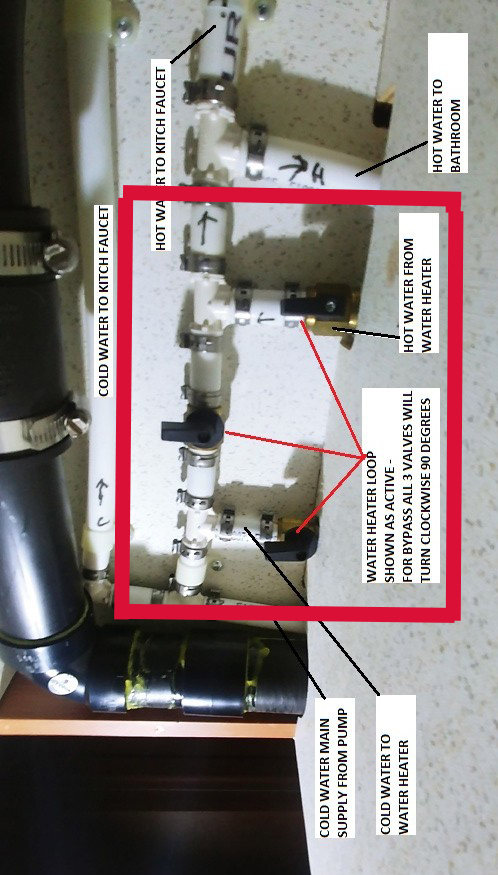
This is an article that we have been asked to write a number of times and it is a common question that comes up on Facebook groups and forums. The Suburban Hot Water Heater in the Roadtrek has THREE (3) BYPASS VALVES to put the hot water heater into BYPASS MODE when winterizing or when you want to take the hot water tank out of the flow of water in the plumbing. The 210 valves and location are at the end of this article.

Here is a photo of the hot water tank inside my Roadtrek 190:


You can see the three valves that need to be set here against the foam insulation around the hot water tank. I will go into detail about these three valves but using this photo, I am going to explain the flow of water in and out of the hot water heater. The water source can be from the water pump or from city water - the water that comes into the plumbing when you connect a fresh water hose with an RV water pressure regulator connected to the hose that is connected to an outdoor water spigot.

Take a look at the pipes in front of the foam insulation around the tank. There is one that goes across the tank at the top. There is one that goes across the tank at the bottom. There is one that goes up and down between those two pipes.

When the hot water tank is in use - NOT BYPASSED - the cold water comes into the hot water tank in the bottom tank. You can see the COLD sticker there next to the valve.  Inside the tank the heating unit makes the water hot and the hot water stays in the tank until you turn on the faucet hot handle or the hot handle on either of the shower faucets. When water leaves the tank, water is instantly put back into the tank at the bottom filling it back up again. As I have written in another article - the hot water tank is never empty - unless you remove the anode rod that is in the compartment for the hot water heater outside on the driver's side of the van. Now knowing this - this is how the valves work.

The valve on the bottom of the tank when OPEN lets water flow into the tank. When it is closed, the cold water does not go into the tank. Here is a photo of the bottom valve closed. Note that this valve broke on my Roadtrek and the service at the Roadtrek dealer replaced it with a metal handled valve - your valve will have a black handle if it is the valve that came from Roadtrek (just like the other valves you see in the photo).


THIS VALVE IS IN BYPASS POSITION. This is how you want to set your valve when it is to be put in BYPASS MODE. Notice that the valve is turned ACROSS the pipe (side to side). THIS VALVE IS CLOSED.   (If this valve was turned in line with that pipe - going from front to back - this valve would be OPEN - allowing water to flow into the hot water tank.) IN BYPASS YOU WANT THIS VALVE TO BE CLOSED - JUST AS IT IS IN THIS PHOTO.

We look next to the valve on the pipe going into the tank at the top of the tank. There is a red sticker that says HOT next to that valve. This is where the hot water comes out of the tank.


THIS VALVE IS IN BYPASS POSITION. This is how you want to set your valve when it is to be put in BYPASS MODE. Notice that the valve is turned ACROSS the pipe (side to side). THIS VALVE IS CLOSED.   (If this valve was turned in line with that pipe - going from front to back - this valve would be OPEN - allowing water to flow OUT OF the hot water tank.) IN BYPASS YOU WANT THIS VALVE TO BE CLOSED - JUST AS IT IS IN THIS PHOTO.

These two valves open or close the pipes that put water into and out of the hot water tank. They are important parts of the BYPASS three valve system - and in BYPASS they must be CLOSED. But we have a third valve - the one on the pipe that goes up and down between the other two pipes. This is actually the main valve for BYPASS. What this VALVE IS OPEN cold water goes from the bottom pipe (where it cannot go into the hot water tank any longer because the bottom valve is CLOSED) and goes up the up and down pipe. Take a look at the valve on that pipe -

 THIS VALVE IS IN BYPASS POSITION. This is how you want to set your valve when it is to be put in BYPASS MODE. BUT TAKE NOTICE  that the valve is turned in line with the direction of the pipe pointing UP. THIS VALVE IS OPEN!   (If this valve was turned across the pipe and the end pointing toward the cabinet opening - pointing toward the aisle - going across the pipe - this valve would be CLOSED and water could not go up the pipe. IN BYPASS YOU WANT THIS VALVE TO BE OPEN - JUST AS IT IS IN THIS PHOTO.

So what happens in BYPASS - cold water comes in at the bottom pipe and goes UP that up and down pipe and goes into the top pipe and then continues along in that pipe to the sink. IF you have your hot water tank in BYPASS - no water ever goes inside the hot water tank - and if you turn on the hot water faucet at the sink or the showers you will get COLD water coming out of the sink - even though you turned the hot water handle on. That is exactly what you want it to do.

Why do you want to Bypass the hot water tank? When winterizing if you do not bypass the hot water tank will fill with RV anti-freeze before that anti-freeze will go into the sink or showers and their respective pipes. The hot water tank is SIX GALLONS! You will waste SIX GALLONS of RV anti-freeze before every putting the RV anti-freeze where it is needed. And since the hot water tank is always full - well that is a lot of wasted anti-freeze! Emptying the hot water tank will protect it just fine. These valves and these pipes will fill with RV anti-freeze in the process I describe in my articles to winterize your Roadtrek.

So let's go back over this step by step  -

1) Turn the bottom valve ACROSS the pipe - CLOSING THE VALVE.

2) Turn the top valve ACROSS the pipe - CLOSING THE VALVE.

3) Turn the middle valve - pipe going up and down - in line with the pipe with the handle pointing UP - OPENING THE VALVE.

YOU NOW HAVE A HOT WATER TANK IN BYPASS!


 In the Spring to put the hot water tank back into the water system to provide hot water reverse these steps. In working position, all the tips of the valve handles point toward the aisle. The top and bottom valves will be OPEN and the up/down pipe valve will be CLOSED.

There is one thing you may want to also do - and this is up to you.  I get concerned that if we are inside the Roadtrek or traveling with it when winterized, one of us might - by accident - turn on the hot water heater switch on the wall - with the hot water tank empty. That will do serious damage to the hot water tank and hot water heater. There is a fuse (the hot water heater is a 12 volt appliance) - not a circuit breaker - in the Roadtrek fuse box for the hot water heater and that is all that is on that fuse. By removing the fuse you cannot turn on the hot water heater - no matter how the switch is set. JUST REMEMBER when de-winterizing to put that fuse back or your hot water heater will not turn on.

Thanks to a very gracious reader, Nick, we have been able to now include where these valves are in a Chevy Roadtrek 210.  Nick took the photos inside his 210 for us. These same valves are in a different location in the 210. Here is a photo of the cabinet they are located just below the sink -


The valves on the right side of the cabinet on the left wall of the second shelf section

The hot water tank is inside the cabinet to the left..

Here is a close up look inside this section of the cabinet -

You can see the valves pointed to with the red lines and labeled. To orient these to our article turn the photo counterclockwise:

The valves are turned just as they are in the 190 when putting the hot water tank into bypass or taking it out of bypass. 

Here is where the hot and cold water pipes go through the cabinet wall to the cold intake and hot output connections on the hot water tank:


Sunday, September 3, 2017

HOW TO SWIVEL THE FRONT SEATS IN A CHEVY ROADTREK

The question of how to swivel the front seats has come up a lot about Roadtrek 170, 190, and 210s. Meryl is a master at it and I asked her if she would write an article about. Instead of her writing it she told me to watch and take notes as she did it one night on our recent trip. She makes it so easy and if you follow these steps you will be able to do it easily too - and you won't have to open the doors to do it! She starts with the passenger seat and there is a reason - so start with the passenger.


EACH SEAT NEEDS TO BE UPRIGHT ALL OR MOST OF THE WAY. DO THIS BEFORE YOU START!


SWIVELING THE PASSENGER SEAT:


 1. PUT THE WINDOW VISOR OFF THE CLIP AND DOWN TOWARD AND AGAINST THE WINDSHIELD.


2. CLOSE THE FRONT WINDOW CURTAIN. (Unhook the curtain straps and slide it around the passenger side window to the middle of the dash board.) Do this now if you had intended to do it later.


3. PUT THE RIGHT ARM REST DOWN IF THE SHOULDER BELT IS CAUGHT ON THE ARM.


4. RELEASE THE SEAT SLIDE UNDER THE FRONT OF THE SEAT AND SLIDE THE SEAT ALL THE WAY FORWARD.


 5. LEAN OVER THE SEAT TO THE SWIVEL RELEASE AND PULL IT UP and HOLD IT - ONCE YOU START TURNING YOU CAN LET GO OF THE RELEASE.


 6. TURN THE SEAT ALL OF THE WAY AROUND TOWARD THE MIDDLE ALL THE WAY TO FACING TOWARD THE REAR.  (Counter-Clockwise). YOU MAY NEED TO MOVE THE SEAT SLIGHTLY FORWARD OR BACK AS YOU TURN IF IT GET CAUGHT ON ANYTHING.


DONE!


SWIVELING THE DRIVER SEAT:


1. PUT THE WINDOW VISOR OFF THE CLIP AND DOWN TOWARD AND AGAINST THE WINDSHIELD.


2. CLOSE THE FRONT CURTAIN. (Just as you did for the passenger side.)


3.  RELEASE THE SEAT SLIDE UNDER THE FRONT OF THE SEAT AND SLIDE THE SEAT ALL THE WAY FORWARD.


4.  LEAN OVER THE SEAT TO THE SWIVEL RELEASE AND PULL IT UP and HOLD IT - ONCE YOU START TURNING YOU MAY RELEASE IT.


5. START TURNING THE SEAT TOWARD THE MIDDLE. (Clockwise)


6.WHEN THE SEAT HITS THE MIDDLE HUMP - GLOVE COMPARTMENT - STOP.


7. RELEASE THE SEAT SLIDE AND PUSH THE SEAT PARTWAY BACK. 


8.  NOW TURN TO THE MIDDLE.


(THE SEAT CANNOT BE TURNED AS FAR AS THE WALL OF THE WARDROBE. THERE IS NO WAY TO NOT DO THIS. THE SEAT WILL BE AT A SLIGHT ANGLE TOWARD THE MIDDLE AISLE - WHICH IS JUST ABOUT RIGHT TO SEE THE TV OR USE THE FRONT TABLE.)


 DONE!

Once the seats are swiveled you can slide them forward or back to where you like them. It is not hard to do IF YOU FOLLOW THESE STEPS IN ORDER. Just reverse the process to put them back facing front!


Even I can do it now and without opening the doors!  I had intended to take photos but it is just too close to get any meaningful photos of the process - but with these simple instructions you should not need photos.


THANK YOU, MERYL!

Wednesday, March 29, 2017

A Review of the Classic Roadtrek Electrical System

We get a lot of questions from readers about the electrical system in their Roadtrek. We always are happy to respond and answer what we can. In 2012 and 2013 I wrote a series of articles that explain the electrical system in our - and in what I would call a "classic" Roadtrek. Classic meaning a basic system that does not include the new electric options that Roadtrek has introduced since my 2011, starting in about 2013/14. This means no solar panels, no lithium EcoTrek batteries, no VoltStart, and no Engine Generator. This does include coach battery or batteries, shore power plug in, an Onan built in generator, an isolater or separator, an engine battery, and a three in one inverter, converter, charger or two units - inverter and converter/charger.

I will start with a very important tool in understanding the electrical system in these "classic" Roadtrek electrical systems - a computer simulation of the electric system. To use you must specify a year and model in the drop down menu that is at the bottom of the left column on the page. Select 2010 for years 2010, 2011, and 2012 - and possibly 2013. If you have a basic electric system in your Roadtrek beyond those years select 2010 also. IN ADDITION, there is a link at the top of the Simulator page for NOTES.  This will open a PDF file that gives a great deal of explanation. I did not create the simulator nor write the "Notes". I was sent this link by Roadtrek back in 2011 and the author of the simulator has updated the Notes since.

ROADTREK ELECTRIC SIMULATOR

Next, some history as I know it. Originally the electric system used a converter/charger unit and in some (and not in some at all) an inverter unit. The converter/charger charges your batteries and takes 110 volt power and converts it into 12 volt DC power. The inverter takes 12 volt DC power and changes it into 110 volt AC power.

During the 2005 model year, Roadtrek began to change this. Instead of two separate units, they started to install a three in one single unit that provided all three functions - inverter/converter/charger. By 2006 the changeover was complete. If you own a 2005 Roadtrek you may or may not have the single unit - you may have the two separate units.If you have a model year before 2005 you have the two separate units. If you have a 2006 you have the single unit. The single unit installed in 190s, 170s, and 210s is the TrippLite 750. In the Sprinter models, there is also a TrippLite but a more powerful unit - greater in wattage than 750 watts. With the larger unit you can run the microwave oven on your inverter. With the TrippLite 750 you cannot.

At the end of 2010, Roadtrek made another change. They stopped using wet cell deep cycle coach batteries and started using AGM deep cycle coach batteries. The change over is complete with the 2011 Roadtrek model year.  I know many with 2010's that got deep cycle wet cell coach batteries, but some have told me that their 2010 came with AGMs - likely late in the model year.  If you have a 190 and have two coach batteries. With the AGMs these are two 6 volt coach batteries wired in series.

I am not going to go completely though each component in the electrical system again, as the articles from 2012 cover these fairly well - and those articles, I have been told, have helped many. I am going to link those articles here so that it is all in one place. Start with the first introductory article and then read the rest from there. Here are the LINKS -

THE ELECTRIC SYSTEM - Intro

BATTERIES

THE GENERATOR

SHORE POWER

THE INVERTER

LOCATING THE INVERTER

CHARGING THE ROADTREK BATTERIES

IMPORTANT TO KNOW ABOUT THE INVERTER

LOW COACH BATTERIES AND THE GENERATOR

GETTING AN ACCURATE READING OF THE BATTERY VOLTAGE

THE BEST WAY TO KNOW YOUR BATTERY'S VOLTAGE 

PLUGGING INTO AN OUTLET THAT IS NOT 30 AMPS

To give you some brief information not covered in the above, your Roadtrek has either a Battery Isolater OR a Battery Separator. Each provides the same function BUT each works a differently to do this from the other. If you have a Roadtrek before 2006 (or 2005 IF your 2005 has the three in one inverter/converter/charger) you have a BATTERY ISOLATER. If you have a Roadtrek after 2005, you have a BATTERY SEPARATOR (specifically, a Sure Power 1315-200 Bidirectional 12 volt 200 amp battery separator. Either should be located in your engine compartment on the rear wall just about in front of the steering wheel. What these do is keep your engine battery and your coach battery(ies) apart and stop one from draining the other. The engine battery and the coach batteries are linked between these units BECAUSE while you are driving your engine battery will charge your coach battery - and similarly, when plugged into shore power or running your generator, your coach batteries will charge your engine batteries. (There may be some exceptions - see the simulator as this will show you exactly what happens when the engine is running OR the engine is off and you are plugged into shore power or running your generator- specifically for your year and model).  The change from a Battery Isolater to a Battery Separator came because of the TrippLite three in one unit which did not work correctly with a battery isolater. Be aware that the Isolater or Separator do not last forever. They can go bad over time. I have been told that when odd things start happening with your batteries and electrical system the first thing to do is have the isolater or separator checked. It can be tested to see that it is working properly. Now - just a personal observation. This past year I was not certain that the battery separator in my Roadtrek was functioning properly. I have since determined that it does. When I was unsure I set out to find the Sure Power 1315-200 Bidirectional 12 volt 200 amp battery separator to replace it. I assumed - never assume - that it was a common part. It is NOT. I contacted a few local RV dealerships (not Roadtrek) and they did not stock this - some had never heard of this particular model. I did locate it on the Internet at just a few RV parts retailers - in the middle and on the other side of the country. It is not a matter if it goes bad you can get a new one right away. You will wait to have it shipped to you or whoever is going to replace it for you. Interestingly, I have discovered the same thing about AGM 6 volt deep cycle batteries - 12 volt are easy to find - 6 volt are not.

Here are three links to help with the Sure Power 1315-200 Bidirectional 12 volt 200 amp battery separator -

LINK 1

LINK 2

LINK 3

Take your time reading the different articles referenced and linked in this article. Read them more than once. It takes some time to put all of this together and understand how this or that works - or even just what it is and does. 

So there you have it. I am still happy to help and answer your specific questions. It is best to use the Email Us link that is located in the column to the right on this page and email us directly rather than putting a comment on this article. It is much easier to interact with you this way and get the specifics. When you email, please remember to include the year and model Roadtrek that you have (or any RV - we get lots of questions on basics from non-Roadtrek or even Class B owners).


Wednesday, August 3, 2016

Plugging into an Outlet that is Not 30 Amps

We have been contacted a number of times and also have answered this question on several forums and this article will put it all out as to what and how when you need to plug your 30 amp RV - Roadtrek or any other - into an 110/120 volt electric outlet that is not 30 amps. This might be at home - the most common application of this - when needing to plug in and all that is at your house is an outdoor 15 or 20 amp outlet. Then there is also situations at campgrounds where you find yourself faced with plugging your 30 amp RV into a 50 amp outlet. When you plug in your RV into an outlet whether at home or in a campground no matter how many amps the outlet in the world of RVing you are plugging into "SHORE POWER".

Let's start with the more common - plugging into a 15 or 20 amp outlet. Before we go into details of how you do it, there are a few things to understand and one of what seems to be the most confusing concept involves the limits of a 15 or 20 amp outlet for a 30 amp RV. To start off I would like you to watch this short video clip from a classic television show that has nothing to do with RVs but everything to do with the situation we have here. Watch and laugh - and then we will continue explaining why you watched it. (The video quality is not great - it is not my video but I did not think you wanted to watch the entire episode (which is better quality) for this one scene.)


OK- I find this scene the easiest and funniest way to understand what happens when you plug a 30 amp capacity RV into an outlet that is only 15 or 20 amps. In the scene the magic number is "7". With your 30 amp RV the magic number is "15" or "20" depending on how many amps the outlet is. Home outlets may be 15 or 20 amps. (More on this will come.) In the show if Lisa plugged in a "5" and a "3" the generator would blow - in this show that generator would literally blow (for the sake of comedy) when this would happen. If you plug your 30 amp RV into a 15 amp outlet you can plug in an appliance that uses 6 amps and an appliance that uses 9 amps and (basically - again more on this coming) all will be fine, but plug in a 6 and a 10 and as Lisa would say, "Blooey!" - you will trip the circuit breaker or blow the fuse that is connected to that outlet in your house!  Why? You only have an outlet with the capacity of 15 amps (in this example) and if you start appliances inside your RV that use more than 15 amps - either singly or together - you overload the circuit and as a safety precaution the circuit breaker trips or the fuse blows out. This is better than the alternative of an overloaded circuit where it bursts into flames and burns down the house.

Another extremely important thing to know when plugging into a house outlet is if there are any other outlets inside or outside the house that are on the same circuit breaker or fuse in the house circuit breaker or fuse box. The fast way to find out is shut off the circuit breaker or take out the fuse on the outlet you are going to plug into and then check to see if any other outlets no longer work (or lights or whatever electric in the house no longer work). IF there is another outlet or circuit on that house breaker, you are SHARING the total amps of that outlet - either 15 or 20 (you will know this by looking at the circuit breaker itself - it will be marked 15 or 20 - or on the glass fuse which will also be marked with its amps). If you are sharing the amps with other outlets, if those outlets are in use you must subtract how many amps are plugged into those outlets (or on that circuit in the case of hardwired lights or appliances in the house) from what you have available in the RV. So simple example. Lets say that you have two outlets on a 20 amp circuit and one of those outlets already has 10 amps plugged into it and in use. The outlet you are about to plug your RV into only has 10 amps for you to use. Plug in 11 amps and "Blooey!".

If you have all of this well understood - and not only by you but also anyone who is going to be in the RV with you - kids especially - you will have no problems plugging your 30 amp RV into a 15 or 20 amp outlet at your (or anyone's) house.  SO - just to ask you a question to make sure you understand. You are plugged into a 15 amp outlet. Can you turn your Air Conditioner (high amp appliance) and your Microwave (high amp appliance) on at the same time? If you answered "NO!" you will be fine.  If you answered "Yes" then go back and watch the video and read this all again. I would also not try this on a 20 amp outlet.

Now, that all out of the way - here is how you do it. I plug my Roadtrek into the house twice a month every month to charge the batteries. It works with no problems. You will need a couple of things. Your 30 amp RV has a 30 amp plug on its power cord. A 30 amp plug does not fit in a 15/20 amp outlet. It is too big and the position, size, of the three prongs will not fit. You are going to need a 30 amp female to 15/20 amp male adapter. They are not hard to find and you can find one at many Walmart stores in the RV section of the auto department. They may have two types. Do not buy the one that is a single unit with a plug on one side and the 30 amp socket on the other side of one rubber cylinder. These will work but can be hard to pull apart from your power cord. Buy what is called a "dog bone" adapter. This has a whole 30 amp socket on one end of a thick wire - the same size as your RV's power cord - and on the other end of that wire a whole male 15 amp three prong plug. These are less than ten dollars. They usually have a pull handle on the 30 amp socket (not as pictured here).

 IF your RV power cord will not reach the outlet you want to plug into you also need a 30 amp RV extension cord. Never use a household extension cord - even if it is labeled heavy duty - even if it is 10 gauge wire. Compare that to your RV power cord and you will see that the wire is much thinner. You want to get every amp you can and you do not want an extension cord that could overheat - or worse cause a fire while connected to your RV. Spend the money for an RV 30 amp extension cord. They cost more but will keep your house, your RV, and you safe. The wire on the extension cord should be as thick as the power cord on your RV.


You are now all set!

1. Plug in the 30 amp socket on the adapter to the 30 amp plug of the extension cord.

2. Plug the RV power cord 30 amp plug into the 30 amp socket on the extension cord.

3. Go into the Roadtrek if your RV is a Roadtrek and TURN ON THE BATTERY SWITCH.
    (If you don't have a Roadtrek you may not have to do this - follow the procedure for plugging your RV into "shore power".)

4. Plug the 15 amp plug of the adapter into the 15/20 amp outlet on your house.

DONE.  You now have 110 volts available for use in your RV (with the restrictions we have discussed above). 


If you have a Electric Management System unit - a surge/voltage protector - you might want to plug that in within these connections to. We do - even at home. This is discussed in other articles on our site about hooking up your RV (Roadtrek).

That is all you need to plug in at home - or at someone's home. There are other situations where you might need different adapters and we will look at those now.

When I first arrive at a campground to "check in" and get my site, the first thing I do when I get to the site is test the 30 amp outlet in the power box.  I do this using a Polarity Tester (about $5 generally wherever electric components are sold including home stores and Walmart) and also a 110 volt (AC) volt meter. The meter I use is a device called a "Kill-A-Watt" that is used to test electric appliances for wattage but also will give you the number of volts in an AC outlet just by plugging it in. This also is sold at home stores. You could also buy an AC plug in volt meter on its own - but when I went shopping for one I was not finding any locally and what I saw at RV shops cost twice what the "Kill-A-Watt" costs. Both of these devices have a standard 15/20 amp house plug. To use these to test a 30 amp outlet I use a 15 amp female to 30 amp male adapter - the opposite of what is mentioned and shown above. This has a 30 amp plug and a 15 amp socket. Plug the device into the 15 amp socket and then plug the 30 amp plug into the campground 30 amp power outlet. These devices used this way will correctly read the polarity and the number of volts coming through the 30 amp outlet in the campground box. If they are not right, we go right back to the campground office and let them know that there is a problem. We first ask for another site. If one is not available we ask that they fix the problem immediately.

If the problem cannot be fixed - and there is no other site - the next thing we carry to take care of that situation is a 50 amp male to 30 amp female adapter.

As you can see in this photo, a 50 amp plug - the one on the right - is larger and very different from a 30 amp plug. The 50 amp plug has three blades and one ground. I am not going to confuse you by explaining how the 50 amp plug works, for your 30 amp RV that is not important. What is important is that when you are plugged into a 50 amp outlet using one of these adapters to plug your 30 amp RV into, you are only getting 30 amps coming into your RV. It is no different than having plugged into a 30 amp outlet. You can plug your 30 amp EMS unit (surge and voltage protector) into the line with no problem - it will work exactly as it does when you are plugged into a 30 amp outlet directly. All you are getting are 30 amps.

So plug your 30 amp RV power cord into the 30 amp socket on this adapter and then plug the 50 amp plug into the 50 amp outlet in the campground box. You are now in business - just as if you were plugged into a 30 amp outlet.

If you find yourself looking at a 30 amp outlet in a campground box that is loose or when you plug into it, it just does not seem right - and there is no other site to be moved to - use the 50 amp to 30 amp adapter shown and described above.

Now - one final word of advice -

When plugging in at a campground into a 30 amp outlet - or a 50 amp outlet - there is usually a circuit breaker in the box over the outlets for each outlet in the box. You will know which goes to which as the breaker will be labeled - 30 amp or 50 amp. BEFORE you plug anything in, switch that breaker to OFF. It is always best to do everything safely. Plug into an outlet that is OFF and you will not get shocked. Check the circuit breaker first - unfortunately, not everyone does what is safe and they often disconnect with the breaker on - which YOU should NOT DO, and you will find the circuit breaker was left on. Shut it OFF. Plug the plug in, and then click the circuit breaker to ON. Done! Safe!

We have been to two campgrounds where there was no circuit breaker in the box for the outlets. I was not thrilled plugging in that way, but there was no choice - just use extra caution.

At home you would have to go inside the house to the circuit breaker box to turn off the breaker and then go back in to turn it on. Since we plug appliances into 15 or 20 amp outlets in our homes every day with the circuit breaker on, it is really no big deal to plug the adapter and power cord of the RV into a live 15 or 20 amp outlet. The more amps the more dangerous. It is the same 110 volts but it is the amps that can kill ya! Heard that in some show or movie about a prison electric chair...

"Shocking, simply shocking."


Wednesday, June 22, 2016

Routine Maintenance

One of our readers emailed and said that they looked for a list of routine maintenance items on our site for their Roadtrek and could not find anything. She was correct - I have never put them all in one place - though they are scattered throughout various articles on this site. I responded with a detailed list and I am going to share that here with all of you. I will note on each if it does not apply to all Roadtreks - and some of these apply to all RVs and travel trailers. There is no particular order to these maintenance items. So here they are -

Routine Maintenance


1. For those with a Onan generator -> Change the oil in the generator every 150 hours or at least once every year. It takes one quart of oil.  In 2012 Onan came out with a new model with a few changes that don't apply to Onan generators from 2011 and earlier, and Roadtrek used the new one in later models - so the manual on their website now is for the newer model. If you are looking for the Onan manual for the older model - Microlite 2800 KV do a search on Google and it is out there. The manual shows how to change the oil.  There is a maintenance schedule in there plus diagrams and how tos. The new and the old manual have the same maintenance schedule and the oil is changed exactly the same way. You can do this yourself or have an RV service center do it. It involves being upside down under the van and doing most of the job by feel. You will need some way to get the oil from the bottle to the dipstick hole. There is a pump that attaches to oil bottles sold in marine stores and Walmart's fishing/marine aisle also has this. Connect the pump to the oil bottle, put the tube into the dipstick hole - after draining all of the oil and closing the drain plug securely - and pump. For the KV - one quart of oil only. For the newer model - up to 20 ounces of oil. Type of oil varies by usage - see the manual.

2. Again for Onan owners - Run the generator for two hours under half load once every month. Half load is anything that uses 1400 or more watts. The A/C while cooling does this. The A/C/Heat Pump while heating does this. (For both I turn the thermostat up or down to keep the compressor running.) When it gets too cold for the heat pump - 40 dF outside or colder - I bring in a house ceramic electric heater and plug that in and run it. So that I don't forget, it is on my calendar on my phone and computer with a reminder alarm for the 15th of every month.

3. Charge the batteries by plugging into shore power at least once a month - and keep an eye on battery level in case it falls to two LEDs and if so plug in then. This past year I started going to a twice a month schedule because the batteries were not making it through the month. The cold weather will drain the batteries faster even without use. I had set the schedule on my calendar for the 28th of every month and now I have added the 13th of every month. Plug in to shore power to charge. (Of course, if we are traveling on any of these days I don't do this - it is getting charged by driving and being plugged in every night at the campground.)  If you don't have AGM coach batteries which are maintenance free - always check the fluid level of deep cycle wet cell RV batteries regularly to make sure charging has not boiled the fluid too low or away completely. Always keep an eye on the battery level and charge when needed. You never wan to allow the batteries to go below half charge. If they are getting low, charge them! It is easy - plug in, run the generator, or drive (drive with a Roadtrek after 2005).

4. If you have a crank up, directional roof television antenna - Lubricate the crank up antenna once each year. Here is an article on how to do that (hard part is getting up to the antenna (I don't like heights and I need a big ladder to reach - never get on the roof or put any weight on it that is not evenly distributed - best to not put any weight on the roof) -  http://roadtrek190popular.blogspot.com/2013/01/lubricating-crank-up-roadtrek-tv-antenna.html

5. Lubricate the black tank and grey tank seals by pouring a half cup of plain mineral oil (found in pharmacies) down the toilet and down the sink. With the sink, follow with some water to push it past the drain trap. The next time you dump the tanks you will be lubricating the macerator also (if you have one) with the oil that is coming through from the tanks. Do this about three times during a season. I do this before the first trip. Then during a mid-summer trip and then again during a Fall trip.

6. Change the van oil either per what the percentage is on the van info panel says on the dash or at least once a year. Also rotate the tires if you feel it is necessary. I have a mechanic that changes the van oil. His garage is not tall enough to put the van up on a lift so he does the oil change and the tire rotation outside with the van put up on floor jacks. He has been really nice about doing this for me and we always wait for a dry day. We do this as soon as we can after we dewinterize. He also does the New York State vehicle inspection at the same time.

7. Winterize in late October/early November or as soon as it seems that there will be nights at 28 dF or below and days no longer in the upper 40's, low 50's. See my various articles on how to do this. Flush the hot water tank with a flush wand after you drain it in this process and also check the condition of the anode rod. Change the rod if necessary. When it gets to the thickness of a pencil or thinner, change it!

8. Dewinterize as soon as you believe there will no longer be any freezing weather. Watch the temps closely. I was going to do this in March when we were getting some really warm days and Meryl said not to - and good thing as we had two snows and a few freezes after that. We did it in late April. See my articles about how to do this.  Sanitize the tanks per my instructions when you do this. Sanitize anytime when you feel the water in the tanks is "funky".

9. Before every trip check the air pressure in the tires. The rear of the 190 should always be 80 in both tires. The fronts can vary between 50 and 65. I was told by Roadtrek to change the front psi if I wanted to improve the ride. They said start at 50, drive and see how it feels on the road, then increase in steps of 5 psi and test drive. Stop when the ride feels the best. They said never go over 65 in the front as the ride starts to worsen after that.  I like the fronts at 60. Make sure you have a tire pressure gauge that goes above 80 psi - car ones don't. I use a gauge and then compare to the dash tire readings. And also if you want to carry a tire compressor get one that goes to 120 psi so that it will not work so hard to put air in the tires. If you get a 12 volt one, always plug into the accessories socket in the dash with the engine running. Your tire psi may be different. Check with Roadtrek for your year and model or go by the sticker on the door frame if there is one from Roadtrek. Don't forget to check the spare tire. I keep the spare at 80 psi - easier to take out air for mounting on front than putting in air to mount on a rear wheel.

10. If you are not driving the Roadtrek during the winter, start the engine at least once every two weeks and let it run for a half hour to an hour.

11. At the end of my last trip for the year, I put an ethanol treatment into the van gas tank. Not for the van but for the generator. This gas and treatment will be used by the generator for all of the exercises during the winter months and into the Spring, cleaning the generator of any deposits. I use something called Lucas Ethanol Treatment. Some use Seafoam and some use Stabil. I like the Lucas because one bottle lasts two years - only need half a bottle for the Chevy Express size gas tank. I buy it at Walmart - each of these is sold at Walmart or any auto chain store.

12. After every time I dump the tanks, I put one gallon of clean water into the black tank down the toilet and then add tank chemical. I use Camco TST concentrate that has a waste digester, a deodorizer and a lube. There are many different ones other there - use any of your choice. Water is the most important thing. Always use a lot of water for the black tank. Flush solids with a good flush of a lot of water. If you put a lot of water in the black tank you should never have a problem with the macerator or even with a gravity system. Also dump when the tank is at least 2/3 full. If you are not sure (my black tank monitor has never worked) pour water down the toilet until you see the water coming up in the toilet drain pipe when the flap is open. That means the black tank is FULL. Then dump. Dump black tank first and then grey tank (which cleans out the hose).

13. You have a fire extinguisher in your Roadtrek (or RV). There is a dial on that fire extinguisher. Make sure that the arrow is fully in the good range. You don't want to find out too late that it will not work. If it is in the red, you can get it recharged or replace it.

There is a Baker's dozen. If I think of more or realize that I have forgotten something that I do, I will add it to this list in an addendum.  Seems like there should be more - and I have not gone into things like cleaning, washing, tightening screws and nuts that come loose from the vibrations of driving (just keep an eye out for those), etc.

Wednesday, June 8, 2016

A New Step in Sanitizing the Hot Water Tank

This year when we sanitized the the fresh tanks with bleach and water after de-winterizing I started to think about the article that I had just written about how the hot water tank works. I realized that since water in the hot water tank gets replaced with fresh water when water comes out through a hot water faucet, the bleach and water mix would take six gallons of fresh water coming though that tank until all of the bleach was out - not including an additional flush. I started thinking about how to easily speed up this process.

The obvious was to pull the anode rod and let the water and bleach pour out of the drain hole, but this still would not easily flush the hot water tank more than once to really get any residue of bleach or odor out. I came up with this idea instead. I would exchange the water in the hot water tank several times with the water coming out of the tank outside - and not needlessly filling the grey tank in the process. Here is how that is done.

1) The hot water tank should NOT be in bypass while sanitizing and it should remain NOT bypassed for this process.

2) Water pump OFF.

3) Attach a fresh hose to the city water inlet and a spigot outside. Turn on the water.

4) Turn on the outside shower hot water handle and open fully - step back!  Only the hot water handle on the outside shower should be open. No other faucet or shower handle should be on.  As the water comes rushing out of the shower (hose optional) you should smell bleach in the water.

5) Allow to run for at least 15 minutes.

6) After a steady flow of water for 15 minutes you should no longer smell bleach in the water coming out. (To test, take a small paper cup and put it under the streaming water coming out. Step away from where the water has been flowing and smell the water in the paper cup. You should not smell bleach.)

7) If you still smell bleach allow the water to continue to flow longer until there is no longer any smell of bleach in the water. (Use a new paper cup if you test again.)

8. Shut off the hot water outside shower handle.

9. You have now exchanged all of the water inside the 6 gallon hot water tank several times with fresh water, flushing that tank as many times.

10. Done!

You will still have the rest of your plumbing, etc. to flush - and at this point it is a good idea to put the hot water tank into BYPASS - just so that you do not put any bleach from the fresh tanks or pipes back into it.

When you are all finished flushing the fresh water tanks and all of the plumbing with fresh water and have removed all of the bleach - no bleach smell - you should put the hot water tank into use by putting the ByPass valves into NOT BYPASS position. You are now good to go!

This article will be linked in our Step By Step De-Winterizing and Sanitizing the Tanks article so that anyone following that article will be taken to this one for this new and easier step regarding the hot water tank.


Wednesday, May 25, 2016

NEW COPILOT REALLY RV SPECIFIC GPS APP PART 2

PART 2

Back to using the app -

Okay, we will continue now as if the problems never happened (or as will hope will eventually be corrected as to routing and we are ready to head off on our trip. The app navigates by GPS.  My Android 5.1 OS is different from my older phone. There is no GPS button to click to turn on GPS. In settings there is are "Location" settings. This sets to one of three settings - GPS, Wifi and mobile networks (which is the default setting), Wifi and Mobile Networks, or GPS only. Set "Location" to  "GPS, Wifi, and Mobile Networks" or "GPS only".  My phone defaults every time Location is turned on to the default GPS, Wifi, and Mobile Networks. I generally keep it off to save battery power. So, with GPS/Location on, you then open the app - if you have not entered your destination as we discussed above, do that and if you have, click on Continue Driving (shown when there is an active route in the app). The map will open to your current location. This photo is borrowed from the Copilot website. The image will move down as you drive with the big red arrowhead designating your RV as it travels along the route. When you are stopped that big red arrow turns into a red circle. You can also set the display to scroll in the actual direction you are going. The speed limit is shown on the display. You can also have a compass show on the display showing your direction. (Since my Roadtrek has the compass on the dash display, I turned this off in the app settings.) At the bottom you get - (left to right), total miles for the trip, the direction and miles to the next turn, and the estimated time of arrival which has been pretty close to actual drive time. Below that you have the next turn you will come to. On the right, the green line is the traffic monitor. Green is clear, yellow is a slow down and red is a traffic standstill. You can set this monitor to up to 100 miles ahead. As you get into any of the yellow or red areas, you will also see that color on the map on the road you are on. The profile that is in operation (which you have chosen) is shown by a symbol on the bottom. In this photo, it is set to a car profile. If this was set to an RV profile there would be a picture of an RV there. (See the photo below this and you will see the RV profile icon in that same place.)


 You can set points of interest to show up along the roads on the display. These appear as icons and the new Copilot RV GPS has redesigned icons from the other Copilot apps that are clearer in what they are. To identify what icon is which category go to the POI More Categories screen and look down the list of categories to see the matching icon.  Below is one of my photos of the app and you can see a restaurant icon in yellow on the display. Oh boy! See that traffic bar there is a slow down that goes to a standstill and back to a slow down ahead before we get to clear road!  You will also see Road Restrictions on the map - either for your specific profile settings or you can see all Road Restrictions including those that don't apply to you.


 The parkways here are No RVs  or trucks allowed and some of the overpasses are 7' - and on the display there are No Trucks Icons all along those roads - and you will not be routed onto those roads - unlike a popular RV specific standalone GPS unit that put us right on those roads! All entrance ramps on these roads are also marked as restricted with a different No Trucks symbol. There are plenty of low clearances on these particular roads but since they are marked for RVs as no entry and are not routed onto them, they do not show up on the display as low clearances. BUT - all other roads that you could be driving on - if you ignored the routing, they do show up marked at that spot with  "Low clearance" and the height. I was not seeing these as I have the Roadtrek height set for ten feet and they are over ten feet and the Road Restrictions Notices set to my profile only - but when I set the Road Restrictions setting to show all on the display - they all appeared - all around me here on the streets and RV permitted roads. Roads are also marked on the display if they are weight restricted and show the weight limit.

TEST: I wanted to see what would happen - driving in my car - with the Copilot RV app if I just happened to ignore the route and got onto a parkway. (This is a different test than detailed above.) I was hoping for an audible warning but it did not do that. It did direct me to get off every exit that I purposely passed in an attempt to get me off the road that I should not have been on. There are low clearances that I went through - in the car - that would have been a serious problem for the Roadtrek - even at ten feet. It did its job. Now one of those exits it told me to get off on was another parkway, but there would have been an exit on that parkway before I had gotten to a low clearance and would have directed me off before that.  Bottom line is, don't ignore the routing. It is set that way to keep your RV legal and safe.

As you approach a turn on a major roadway you will get an image come up on the screen that shows you what the exit looks like and what lane to be in to turn. You can set when this display comes up and how long it remains on the screen. You will also get lane arrows and what they call "Clear Turn" that you see in advance the lanes you need to be in and what the exit will be like as you approach it so that you are prepared in your not so easy to change lanes in suddenly RV.

Let's talk about traffic. As I have said, after the first year of free traffic (that you don't have to activate as soon as you get the app but when you want to so that it would last further into the next year, there is a one year subscription fee of $10 and it will use your data service and your data to alert you to traffic and route you around traffic. In addition to the traffic bar on the side of the screen, when there is a change in traffic along your route you hear "Traffic: X minutes added to your estimated time of arrival" with a screen that says keep driving or choose an alternate route around the traffic. You can just choose that alternate route without seeing it or you could have your partner look at see where it will go. DO NOT TRY TO DO THIS YOURSELF WHILE YOU ARE DRIVING. Frankly, I have found this annoying - and the Copilot car app does the same thing. I tend to ignore it and in less than a minute the screen goes away and you continue to drive into traffic. On a test trip - again in the car - we had this running and I had another feature set to ON - "Active Route". I did not really know what this is and have since found out. I ignored the alert that BIG traffic was ahead and as we got right up to where the traffic was starting there happened to be an exit and the app told me to turn off at the exit. I had not told the app to take an alternate route with the traffic warning that came up on the screen, but it was telling me to get off. I had never had this feature set on with the Copilot car app so I could not understand why it was taking me off onto a street. Well, I sometimes think that I know better than to follow some silly GPS onto a street in Queens, NY so we ignored that too. It tried to get me to go off at the exit following that which was close by. What it was doing was taking me onto the service road which was moving. We for the most part were standing still and we spent 45 minutes in that traffic jam. We should have listened to the Active Route alert because what it does is put you onto an active route that is moving that will get you to where you want to go. It would have taken us back on the freeway after the problem causing the traffic was past. This is a nice little feature - if you trust it - and it is on the Copilot car app.

Test: I have propane restrictions set on my RV profile to ON. This means use no road that says propane is not allowed. This is often some bridges and most tunnels. I had the Copilot RV GPS app route me from home into Virginia. The problem section of this trip are the two tunnels that go through Baltimore that do not permit propane. The app routed me on Route 695 which takes the Francis Scott Key Bridge around Baltimore and south - and that bridge allows propane. I had no influence on this route. It is the route that I have taken with the Roadtrek when I have routed myself with a map to Virginia down I95.  Good job!

Does it drain your phone battery as you are using it? Yes. It would have to, as any GPS app will do. It keeps the screen on all of the time while you are routing. There are settings that you could turn this off. I want to see the display and the route as I go.  If you have a phone screen that does very well in direct sunlight and does not glare, then you can leave your phone display setting dim. My phone, and my past phone have a lot of glare in direct sunlight - as does any GPS standalone unit I have had - and I need to set my screen brightness to 100% which - as a function of the phone and not any app - will drain the battery even faster. BUT, this has never been a problem for me with this or any other Nav app as I have a 12 volt adapter for my phone and plug it into the accessory socket on the dash when I am using a GPS app while traveling. When I get to my destination the phone is fully charged and I have not drained the battery at all along the trip with the GPS app running.

Alright. Let's compare this app to what else is out there for RV GPS routing. Other than RV specific GPS units there is not much - other than the current Copilot car app that currently includes an RV profile with limited settings. There is a Rand McNally RV GPS app which is basically the same software as in their standalone units. It is for Iphone only. There is no Android version. It sells for $99.95. If I thought that $59.99 was high for an app, that is way out. Plus I have used the Rand McNally RV specific GPS standalone app and that routed me right onto all of those parkways where I live that do not allow RVs and have low overpasses that would rip the roof off even a Roadtrek when the RV height on the unit was set to 13 feet and should have routed around everything.   I don't trust the Rand McNally RV GPS. It is one of the alternatives to this app. It sells for $314.00 with a seven inch display screen. It is the Rand McNally RVND 7730 LMRV. It does route around propane restrictions. It does not have traffic routing and a setting for hills (inclines/declines). As I say, it took me onto a road not meant for RVs. There is a TomTom RV specific GPS standalone unit. It is the TomTom VIA 1605M RV GPS Navigator. According to Amazon it is currently not available - and that tells a lot. I don't like TomTom GPS in general. There is one built into the dash of my Roadtrek and up until now I have used the Copilot car GPS app set to RV instead. The most recommended RV GPS is the Garmin. It is the Garmin RV 760LMT Portable GPS Navigator. It sells for $317.48 on Amazon. It also has a 7" screen. It includes lifetime maps and traffic. It has voice commands. It knows known tunnel restrictions, though it has no propane restriction settings. It has an elevation map that can be displayed on screen with steep grades and verbal warnings. When this came out I contacted Garmin and asked why there was no propane setting. They told me that they did not know that was important. They said they might consider it in the future. That was a long time ago. There is also a truck GPS line by Garmin called the DEZL and this has a truck profile and also an RV profile. The truck profile includes a setting for hazardous gas - not specifically propane but it would route around those propane restricted roads. The RV profile settings in the DEZL, like the Garmin RV GPS has no setting for propane restricted roads.  The DEZL sells for $369.99 on the Garmin website store. It is not available new on Amazon. When the DEZL was on display at Best Buy stores I tried it out. It routed me onto the no truck parkways when it was set to the RV profile. Problem!

Let's compare and talk money. What you get with the Garmin and the Rand standalones are the sharp turns and elevation warnings. They are 7" screens. Other than these warnings, the Copilot RV GPS app does all the rest that these do - perhaps better. With the Copilot if you want a 7" screen install it on a tablet and you now have a large display. My new phone has a five inch screen - as most phones now do - and that is large enough to clearly see in the Roadtrek or any RV on the dash (or car towing a trailer). Price for these RV standalone GPS units are both approximately $320. The Copilot RV GPS app sells usually for $59.99. $320 for either standalone minus $60 for the Copilot RV is $260 savings. After the first year, if you want to continue the traffic annual subscription at $10 a year you can buy 26 YEARS of traffic for the Copilot with the savings of $260. That makes it look even better to a budget limited me. You can move the app to a new phone when you get it so your display keeps improving and there will be updates for this app adding new features and correcting any problems.

What can't I do with the Copilot RV GPS app that I could do with the Garmin. I could create a routing with stops on my PC and transfer that to the Garmin. I can't do that with the Copilot. I would have to create the route right on the Copilot app and save it there. This is also what would need to be done with the Rand McNally RV GPS - this gives you 50 stops to route, and the Copilot also gives you fifty (if that featured worked more smoothly on the Copilot RV app).

As to other apps that do the same thing, other than the $100 Rand McNally RV app which is only for IOS and the current Copilot car app with RV profile, there are none. All other GPS apps are not specific to RVs. They do not route you around low overpasses or take RV specifics into their calculations of a route - and for an RV - especially a large RV these are very important. I have seen comments on forums that any GPS is OK for an RV, just download low clearance POIs and it will alert you to low overpasses. Well, I know a number of roads that have no exits right before low overpasses and I would hate to rely on a warning that I am about to hit a low overpass when there is no way to avoid it other than stopping in the middle of the road. Low clearance POIs are not going to work. You don't want to be routed on that road from the beginning. I have read in some forums that WAZE is a good GPS app - well, WAZE may be good for traffic alerts, but again, it is not routing your RV on roads that it needs to be - nor is Google maps. Plus WAZE needs a data plan actively running to work as the maps are on their server and not on your phone. WAZE also does not shut down in the background with its off button. It will still be using your battery unless you close it through the phone.

One of the most important things to know and understand about any GPS - not just this app - is that no GPS routing is perfect, or perfectly safe. Whenever you route a GPS, look at where it is taking you - you can do this by looking at the "Directions" - and then when you are driving, if something does not look right, if a turn it is telling you to make would take you off the side of the road - just ignore that turn and keep going in a safe direction. I am sure you are all intelligent enough to know and do this, but there are so many reports of drivers turning when the GPS told them to turn into a river or hazard that evidently some just follow orders and do what they are told. It sounds funny, but it can be deadly. (Just a little public service announcement - and now back to our scheduled program...)

Do I like the Copilot RV GPS app? I want to like it. There needs to be a resolution to all of the problems that I am encountering with this app - as detailed in this article.  As it is I cannot recommend it - especially since there is no trial version before you spend $50 or $60. It may be that this app has problems with Android 5.1.1 which is a very recent Android version and while there is now an Android 6, few phones other than very high end phones have it. It may be that it has problem with my particular phone. Perhaps other phone models and other versions of Android or the IOS version of the app have no problems at all. BUT, if it is happening with this Samsung phone with Android 5.1.1, what other phones will it have problems installed in? My concern is this - even if the problem occurs only once in awhile, can you put trust in the app to not do it when you might need the app's help the most?  As I have said, 97% of the time when setting the destination into the app and having it route OUTSIDE or in the RV or car, it has worked fine. Since the app is for RVs and once on your trip, you will be meeting that condition of being either outside or in the RV, the app works as it should. If you are willing to pay the price that is asked for this app, knowing this, then the app meets many of the needs of having an RV specific GPS navigation app.

Is it worth the money - if it worked 100% of the time as it is should? Complicated question depending on whether or not the Copilot car GPS app continues to include an RV profile. If it does not - then had I not gotten this app as I did, and I knew what I know now - which I have just shared with all of you in this article, I likely would buy it just to gain back the ability to route around low overpasses and propane restricted roads. Right now, for a Roadtrek, the original Copilot USA Premium app for $10 does all that I need it to do. If I had a Class A or Class C or a Travel Trailer, I would look to buy this app over Copilot USA Premium as it will meet the needs of an RV specific GPS app much more for such an RV.  I will add that I would be annoyed as all heck that the original Copilot after costing me ten bucks no longer had what I bought it for. I did not need a GPS app. I needed an RV GPS app when I bought it. And as I say, a Class B van RV, the Copilot car app set to RV does just enough to keep the Roadtrek off where it should not go. And, again, for an RV of any larger size, I would definitely want this new Copilot RV app. You can set in any height, length, width, and weight (up to 26000 pounds). BUT this is all contingent on if it it gets updated and fixed so that it works - regardless of phone or OS version.

Does the Copilot RV GPS app need some improvements? OH YES, and I have noted them all in this article as I see them right now. I know that Copilot will be reading this (and I told Copilot I would tell it like it is) and I am going to be looking for updates and a MAJOR FIX that will make some of these changes. Add tight/sharp turn warnings and elevation warnings and there is no question that this app would be the best and most reasonably priced choice for an RV GPS- IF it works. Unfortunately, there is no free try it before you buy it version. You can get that with the car app. You have to decide for yourself.

I will be making comments to this article when there are updates, especially the fix for the main problem  - and perhaps even amend this article if there are changes and improvements made with any updates that come out. As soon as I learn from the techs what they have found about this app based upon my experiences with it, I will share that with you. 

If you would like to visit Copilot's website and see this app here is a LINK to the RV app page.  If you go to the Play Store and look at this app, there is a video about the app. 

This has been a very long article that had to be split into two parts - another of my epics. Much longer than I had intended and it was intended to be one article in one part, not two. When I saw when I printed out the entire article that it was 19 pages single spaced, there was no choice but to split it into two parts.  And the problems kept adding more and more to this article. I looked to see an appropriate place to split it into two parts but there was no spot that would not have interfered with the flow of the article.  One of the things that I saw while using this app and in particular setting it up is that it really needs a manual specific to this app. There is a Help section on the app and this will take you to a "Users Guide" which is a manual type of guide for the generic Copilot collection of apps. It is not specific to the RV Copilot app and having a specific manual for this app would be useful particularly since there are settings and features to the RV specific app that are not on the car Copilot app. At one point a notice appeared on the app that said to click to see how to set RV settings. It basically said fill in the measurements in the boxes for your RV and save that. As I have always looked upon this site as a place for step by step how to's for the Roadtrek and RVs in general, as I went along writing this article I tried to include how tos within it for the Copilot RV GPS app in addition to opinions, tests, and a review of its functioning or lack there of. With this you should have a solid starting point to getting the most out if it, should you decide to buy it. And to Copilot - a detailed and illustrated manual to download from your website specifically for this app would be a nice addition.And please get this app to work as it is supposed to.